Play Together
Hot Air Balloon Flight supports multiplayer, so you can fly the same sky as friends or family. No account needed — just share a room code.
Getting started
- One person picks "Create Room" and gets a 6-character room code
- Send that code to friends however you like — chat app, Discord, whatever's easiest
- Friends enter the code in the "Join" field to land in the same room
- Once everyone's in, pick an area and launch point as usual and start flying
While you're flying together
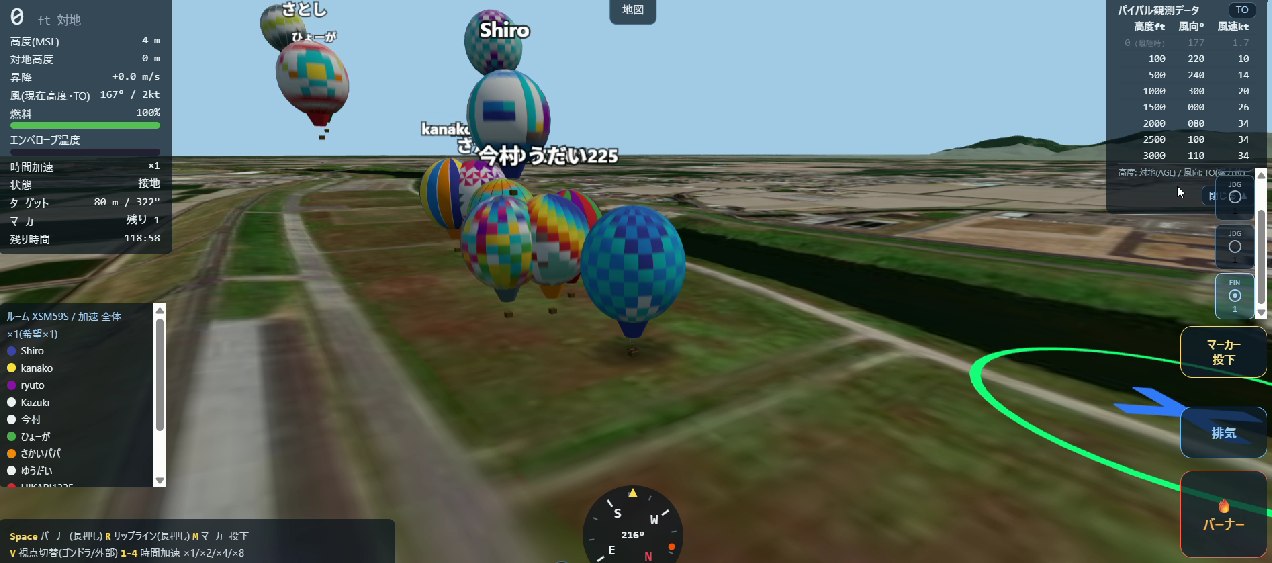
- Other players appear in real time as named "ghost" balloons — each one flying whatever pattern its pilot designed for it, so it's easy to tell who's who at a glance
- The room panel in the bottom-left corner lists everyone's name and color
- Time acceleration (×1–×8) is shared across the whole room — nobody can speed up or slow down on their own. Everyone's individual preference feeds into one shared time flow for the room
About the player limit
To keep server costs down and the game free for everyone, there's a cap on how many people can fly in the same room at once. If you have a larger group, you can just split into a few rooms with different codes.
Anyone who has the room code can join. If you don't want strangers dropping in, be mindful of
who you share the code with.
Want more detail?
For everything else — controls, physics, and more — see the Features page.